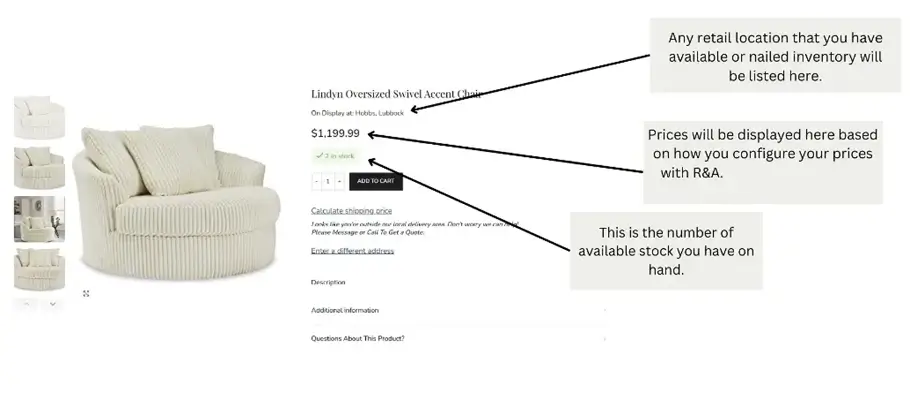
There are two ways this happens:
1 – The Manufacturer SKU should be stored in Storis either in the Item field “Model Number” or “UPC”. If the Manufacturer SKU in Storis is a 1:1 match for the Vendor’s Manufacturer SKU for the product that R&A built, the website will pull in Price and Stock information from Storis and that information will populate on the website. The Manufacturer SKU in the R&A backend Product Dashboard is found in the “SKU” field.
2 – If the Manufacturer SKU is NOT a 1:1 match for the Vendor’s Manufacturer SKU, action is needed on your part! There are two ways to fix this:
- Best Way: Change the Manufacturer SKU in Storis to the correct Manufacturer SKU. Next time the integration runs, it’ll be a 1:1 match and fix your problems!
- Change your Retailer Item ID in the Product Dashboard of R&A to match your Retailer Item ID (Primary Product ID in Storis).
Note: If the Manufacturer SKU on this product ever happens to match another item’s manufacturer SKU, this Retailer Item ID will be overwritten. This is why the best practice is suggested above (update the Manufacturer SKU in Storis to match). If there is something wrong with the Manufacturer SKU as defined for the item in the R&A Product Dashboard, please reach out to R&A support.
Below, you can see an illustration of a product on the website to see what information is being pulled from Storis.